A little guidance.
A clearer next step.
From your first print to a treasured original, find the answers that help you move forward with confidence.
Try “phone photo”, “canvas edges” or “digital files”. Search covers every topic.
Printing & papers
Choose a surface, prepare your file, and know what to expect in print.
What file should I upload?
The print builder and inquiry form accept JPEG, PNG and TIFF. Use the best original file you have, rather than a screenshot or a copy saved from social media. Each form shows its current upload limit.
Can you make a good print from a phone photo?
Often, yes. Use the original full-size photo from your phone; messages and social media may reduce its detail. The suitable print size depends on sharpness, lighting and how much you crop. Send it for a review if you are unsure.
My file is HEIC, RAW, PDF or Photoshop. What should I do?
Those formats are not accepted by the online image upload. Export a high-quality JPEG, PNG or flattened TIFF, keeping the original separately. If you need help converting a file or preserving a particular color setup, send a message before ordering.
How much resolution does my print need?
Around 300 pixels per inch at the finished image size is a useful target, not a guarantee of sharpness. An 8 × 10 at 300 ppi is 2400 × 3000 pixels. Larger prints viewed from farther away may work with less; changing the DPI number alone does not add real detail.
What sizes can I order?
Prints ordered online are at least 5 inches on each side, in quarter inches (like 8.25 or 10.5), and up to 43 inches on the short side (35 on photo papers such as Luster and Metallic, 41 on vinyl, borders included) and 120 inches on the long side. Enter your width and height in inches; larger or unusual work needs a separate quote. Your file may limit the usable size.
Why does my picture get cropped at some sizes?
Your photo and requested print may have different proportions. When they differ by more than 5%, use “Choose / confirm crop” and confirm the area to print. Smaller differences use a centered crop automatically. The main upload preview shows the original; the crop editor and confirmed thumbnail show the crop. Choose dimensions matching your image if you want to minimize cropping, and check faces, signatures and edges.
Which color profile should I use?
A high-quality RGB file with its sRGB or Adobe RGB profile embedded is a useful starting point. Do not convert to CMYK just because the image will be printed. If your file has a different profile or a carefully managed editing workflow, tell us so we can review it.
Will the print look exactly like my screen?
Not exactly: screens emit light, while paper reflects it. Screen brightness, paper texture and the light in your room affect the result. For color-critical work, a paid physical proof is the best way to judge the image on your chosen paper before a larger order.
Is color correction included?
File review and preparation for your selected print surface are included. Removing objects, reshaping an image, advanced retouching and restoration are separate work, quoted for your approval. Tell us if you have already finished the image and want its editing preserved.
Which paper is right for my picture?
Luster is a versatile choice for portraits and family photographs. Baryta brings rich blacks; fine art matte has a quiet cotton-rag finish; watercolor paper adds visible texture. Metallic paper has a luminous sheen, while canvas adds a woven surface. Compare the collection for the look you want.
Is Metallic Paper a metal print?
No. It is a photographic paper with a glossy finish and pearl-like base, not an image printed on an aluminum panel. The current online builder treats Metallic Paper and Luster as print-only choices intended for framing behind glass.
Can I see a sample of my image before the full order?
Yes. A proof is a paid test print of your image, priced at our standard print rate for that size and paper. Proofs are not spray coated, so matte and canvas proofs cost a little less. It is useful for checking color, detail and paper before approving a larger run. Include proofing in your project request and review it in the light where the finished piece will be displayed.
How is the printing price worked out?
Size, surface, quantity and finishing determine the price. The pricing calculator shows current options; your order total adds applicable tax and delivery charges before payment. A frame, restoration or other separately quoted work is included only when the order says so.
What does archival mean, and how should I care for a print?
Our giclée process uses pigment inks with papers selected for lasting prints. Lifespan varies with the surface, light, humidity and handling; there is no single lifetime for every print. Keep prints out of direct sun and damp areas, handle by the edges, and use suitable framing for paper prints.
Is peel-and-stick vinyl suitable for every wall?
No. The finish and condition of the wall or window matter. Vinyl is a specialty display surface; discuss the location, expected lifespan and suitability before ordering rather than assuming it will adhere to any paint or remove without marks.
How does the recommended maximum print size work?
After upload, the form shows your pixel dimensions and a recommended maximum. It uses 300 pixels per inch with up to 2.5 times enlargement, then suggests a common size that fits. Cropping or zooming can reduce usable detail. This is a size guide, not a guarantee that a blurry original will become sharp.
Why does the form warn about softness or block my print size?
Above the recommended quality limit, the form allows up to 30% larger dimensions if you acknowledge possible softness. Beyond that limit, ordering is blocked. Choose a smaller size, reduce crop zoom or upload a higher-resolution original. Acknowledging softness cannot override the largest permitted size.
What does the Original size button mean?
It calculates a print size from the uploaded pixel dimensions at 300 pixels per inch, rounding each dimension down to the nearest quarter inch. It does not recover the physical size of a photographed original. The result may need a custom frame; review the dimensions and any crop before ordering.
Can I order several images or change a print already in my cart?
Set the quantity for copies of the same image. After adding it to the cart, choose Add another image for a different photograph. To change the size, paper or crop of an existing print, use Edit in the cart and review the updated price before checkout.
Why is Add to cart unavailable?
Follow the Before adding to cart checklist: upload an image, choose a valid size, choose paper or canvas, and choose print only or finishing. Confirm a crop or acknowledge softness when requested. Quantity starts at one. If the price fails to load, use Try price again; an expired upload needs to be uploaded again.
Art reproduction
From your original artwork to faithful files and prints you can share or sell.
What do you need to quote my artwork?
Send a quick photo, the medium, approximate dimensions and the prints you hope to make. Mention glazing, heavy texture, fragile areas or unusual materials. We will explain capture, printing and finishing costs before work begins.
How do you turn an original into a print?
We capture the artwork, prepare a digital reproduction and compare it with the original to refine color and detail. A paid proof lets you assess the result on paper before a larger run. Printing and finishing are separate from the capture unless your quote includes them.
Do you need to see the original?
Having the original lets us compare its colors and details with the reproduction. If you already have a file, we can assess it for printing, but we cannot verify its color against an original we have not seen.
Should I bring or ship my original artwork?
Start by telling us about the piece and arranging how it will reach the studio. Bringing it to Kennewick lets us look at it together. Do not ship an irreplaceable original without first agreeing on handling, transport and return arrangements.
Should I remove the frame or glass first?
Tell us whether the piece is framed, glazed or firmly attached to a backing. Do not unframe fragile artwork or lift anything stuck to glass just for a quote. A phone photo helps us discuss a suitable capture approach before you bring it in.
Can you capture large or textured artwork?
Large and textured pieces need an assessment of their dimensions, surface and condition. Tell us about thick paint, metallic pigments, varnish or reflections. We will explain the capture approach and any limits before accepting the work.
Will a print reproduce raised paint or metallic shine?
A reproduction can show the appearance of brushwork and texture, but a flat print does not recreate the original’s raised paint or changing reflections. Paper texture and sheen influence the effect. A physical proof helps you choose the closest useful interpretation.
Do I receive the reproduction file?
Yes, the agreed master file is supplied to you. Confirm the file format, intended use and delivery method in the quote, and keep your own backup. Capture does not automatically include every print, size or finishing option.
Can I make prints larger than my original?
Sometimes. The captured detail, original medium, desired size and viewing distance determine how far the image can be enlarged. Tell us the largest size you hope to offer before capture, so we can assess it rather than promise an unlimited enlargement.
Can I start with one print and reorder later?
Yes. You can begin with one print or a small run and order more as needed. Keep the approved master file and a record of paper, size and proof choices so the next order has a clear reference. Paper and viewing conditions still influence the result.
Can you reproduce artwork I bought from someone else?
Owning the physical piece does not necessarily include permission to reproduce it. Our ordering terms require you to hold the rights or permission needed for the work you request. Resolve that permission before ordering copies.
Restoration & editing
Understand what can change, what can be recovered, and how we protect the original.
Is a phone photo enough for a restoration quote?
Yes, a clear phone photo is enough for a first look. Photograph the whole image in even light, avoid glare, and tell us which damage or people matter most. We may need a better scan or the original for the finished work.
Will you change my physical original?
Restoration is carried out on a digital copy. We repair that image rather than repainting or altering your original photograph. The condition of a fragile original may affect how it can be safely captured.
My photo is stuck to glass or an album. Should I remove it?
Leave it where it is. Pulling it away can tear the photograph or lift the image surface. Send a phone photo and describe its condition so we can discuss handling and capture before you transport it.
Can you repair tears, fading and missing pieces?
Many tears, creases, stains and faded areas can be improved. A missing face or other lost detail may need reconstruction rather than recovery, and some information cannot be known from the remaining image. Other photographs of the person or scene can help as references.
Can you colorize a black-and-white photograph?
Yes, colorization can be discussed as part of a restoration quote. Unless you provide reliable references, some colors are an interpretation rather than a record of the original scene. Tell us if keeping a historically faithful black-and-white version is important.
What determines the restoration or editing cost?
The image’s condition, complexity of the changes and intended result determine the quote. Send the best source you have and describe what matters most; the current pricing page gives starting rates. Prints and finished-file delivery should be specified in the quote.
How is paid editing different from print preparation?
Print preparation gets an image ready for its selected surface. Paid editing changes the picture itself, such as removing a distraction, combining photographs or retouching a face. We explain and price that work before starting.
Can you remove a person or distracting object?
Often, but the result depends on what needs to replace it and how much usable detail remains. Send the image and identify exactly what to remove and what to preserve. We will assess whether a natural-looking result is realistic.
Can you combine two photographs or change a background?
We can assess composites and background changes. Similar lighting, camera angle and image quality make the result more convincing. Send the original files and explain the final image you want before paying for the work.
Can editing make a very blurry photo sharp?
Sometimes an image can be improved, but software cannot reliably recover details that were never captured. Motion blur, missed focus and very small files have limits. We will assess the source and explain what a realistic improvement could look like.
Do you use AI in restoration or editing?
Tools may assist where they help, with the result reviewed by a person. Reconstructed detail should not be mistaken for recovered fact. Tell us before quoting if you want to avoid generative changes or need a documentary record preserved.
Can you keep the result natural?
Yes—tell us what you want to preserve as well as what you want changed. Expressions, age, skin texture and the character of an old photograph can be important. Reference images and clear priorities help us agree on the extent of the work.
Will I get a new print, a digital file, or both?
Agree on the deliverables when we quote the work. A new print can be added, and the quote should identify any finished files, sizes and delivery arrangements. Do not assume a restoration fee includes every print or digital option.
Scanning & preservation
A few favorites or a whole collection: make a useful plan for your memories.
What can you digitize?
We work with photographs, slides, processed negatives and other suitable originals. Tell us what you have, its approximate size and condition, and whether it is loose or in albums. Mention unusual film formats or documents so we can confirm suitability.
Do I need to sort and count everything first?
No. A rough quantity and description are enough to start. If you already know dates, names or family groups, keep those notes with the relevant material; avoid writing on the image surface. We can discuss priorities before you commit to scanning the whole collection.
How should I prepare my photographs and film?
Keep material in its existing protective sleeves or containers where practical, and flag fragile items. Do not peel photographs from albums, apply tape to tears or try to scrub film. Contact us first about anything stuck, flaking or difficult to transport.
What scanning resolution should I choose?
Tell us whether the files are for family sharing, archiving or larger prints. The original’s size and detail determine the useful scan resolution; a bigger file alone does not guarantee a better image. We agree on the scan and delivery requirements when quoting.
Does the scanning price include restoration?
Scanning captures each original as it is. A basic enhancement (color and/or contrast, and minor scratches cleaned up) can be added to every scan at a set price a photo when you order. Tears, stains, heavy fading, missing pieces and colorizing are restoration, priced after we see the originals.
Will I get my originals back?
Yes. The job agreement records the originals and how they will be returned or collected. Tell us about particularly valuable or delicate pieces before leaving them with the studio.
How will I receive and organize the scans?
File format and delivery are agreed when we price the collection. If folder grouping, filenames or copies for family members matter, include that in your request. Keep your own second backup of the finished files.
Can I order prints from the scans?
Yes. Scans can be assessed for new prints, with size depending on the detail in the original and scan. Printing and any restoration are quoted separately from digitizing.
Can I send you a collection from out of town?
Contact us before sending originals. Describe the collection, its condition and where you are, so transport and return arrangements can be agreed. Keep any existing digital copies; an inquiry photo may be enough for the first discussion.
Does scanning make my memories permanently safe?
Digital files are easier to copy, but a single drive or download is not a lasting backup. Keep at least two copies in separate places and check that you can open them. Retain the physical originals where possible; studio file retention is not a backup service.
How do online scanning orders work?
Online preservation scanning requires you to drop off and collect your originals at the studio. It digitizes them as they are; correction and restoration are separate. Choose the scanning service and quantity, and acknowledge the drop-off and collection requirement before adding it to the cart. Contact us first about mail-in work.
Canvas & mounting
Choose the edges, support and finish that suit your picture and its home.
Is an online canvas print ready to hang?
No. Wrap-ready canvas needs a frame shop to stretch it first, as shown below. We do not stretch canvas ourselves, but can take it to a local frame shop for you for $20 plus their bill. For a piece that is ready to hang, choose a finished cradle board or painted panel.
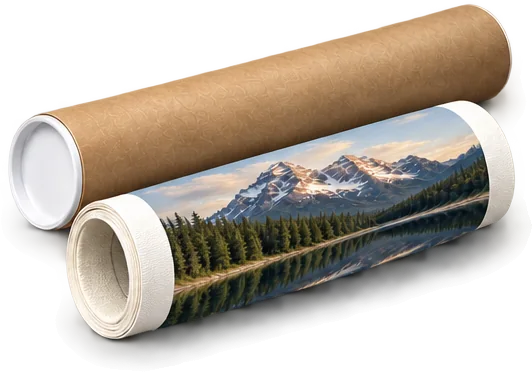 We print your image on wrap‑ready canvas.Sent rolled in a tube, not stretched.
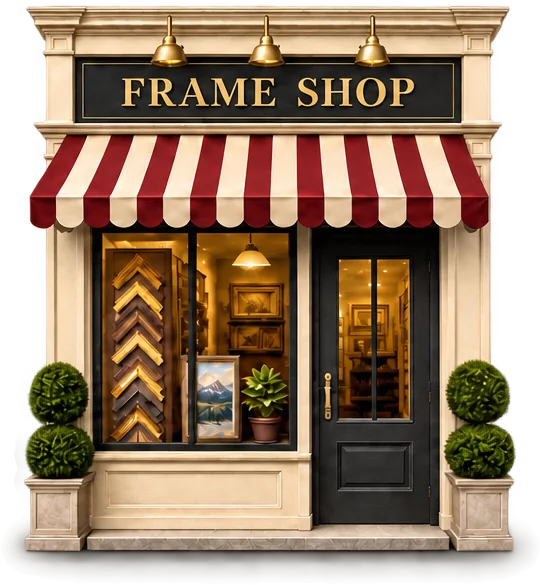 Take it to your frame shop.They stretch it onto a wooden frame.
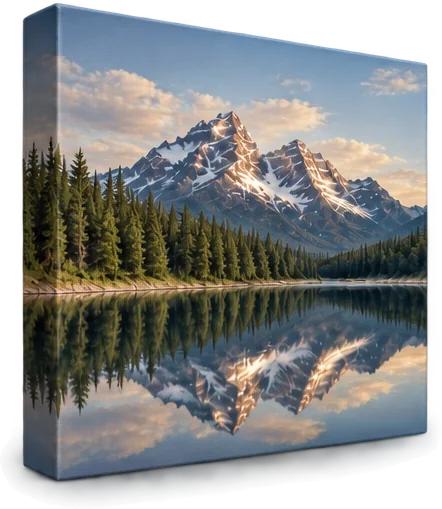 Enjoy your finished canvas.Ready to hang on the wall.
How much extra canvas is added for wrapping?
We add 3 inches of canvas on every side of your picture: 2.5 inches of printed border and 0.5 inch of plain white. A 16 × 20 picture comes on a 22 × 26 inch sheet of canvas. The canvas arrives rolled, so check the stretcher depth with the frame shop that will stretch it.
What are mirrored, solid, white and continued edges?
Mirrored edges reflect the image near its boundaries; solid edges use a chosen color; a white border leaves plain canvas, and costs less; continued edges extend the picture’s detail. These borders sit outside the central image for later wrapping. The online preview shows the central image, not the final prepared borders.
Will faces or signatures wrap around the sides?
Tell us which details must remain on the front. Review the central image and crop before ordering, and allow room for the final finishing method. Added wrapping borders help preserve the image, but important edge details still deserve a careful check.
What is panel mounting?
Mounting attaches a suitable print to a rigid support. The studio offers Masonite, birch plywood, painted MDF and cradle boards, at least 8 inches on each side. We ship panels and cradle boards up to 24 × 36 inches; larger ones are local pickup only, at the studio in Kennewick. Masonite and plywood panels go up to 47 × 60 inches, and painted MDF up to about 2 × 4 feet. A mounted print is not the same as a stretched canvas or a framed print.
Can every paper be mounted?
No. The current builder offers finishing only where supported by the surface. Metallic Paper and Luster are print-only choices intended for framing behind glass. Use the available options for your selected surface, or describe a custom finishing request.
Is a frame or hanging hardware included?
A print price does not include a frame. Cradle boards and frames can have hanging wire fitted, and painted MDF panels can have hanging hooks added, each at a set price you see before you order. A preview or room photograph is not a list of included products.
Is a protective coating included?
Yes, on Fine Art Matte, Watercolor Paper and canvas: two coats of protective varnish are included in the price, and four coats on wrap-ready canvas. It adds UV and scuff protection. It does not make a print waterproof or suitable for unlimited sun exposure.
Can you finish a print I already own?
We can assess it. The paper, inks, size and condition determine whether a mounting or finishing method is suitable. Describe the print and desired result before bringing it in; do not assume every existing print can take adhesive or a coating.
How should I transport and care for the finished piece?
Keep the face of the print protected from rubbing, pressure and moisture, and support larger pieces during transport. Avoid direct sun and damp display locations. Ask for handling guidance matched to the actual paper, coating, frame or canvas finish on your order.
Photography
Plan your session and understand exactly which photographs, prints and files are included.
What do photography sessions cost?
Portrait sessions start at $100 and family sessions at $125, each including one professionally edited 8 × 10 Luster print. Headshots are $100 and simple product sessions are $160, each including one edited digital file. Passport and ID photos are $25 for a short sitting and four 2 × 2 inch prints. Session prices are set; half is paid as a booking fee to reserve your date.
How do I book, and does a request reserve a date?
Choose your session and the date you would like on the booking form. We check the date and email you an invoice for the booking fee, 50% of the session price. Your date is reserved once the booking fee is paid; a request alone does not hold it. The balance is due when you arrive. We also email you the print options you can add.
What does an additional selected photograph cost?
Each additional selected photograph is $20, including color, contrast and lighting enhancement and its first 8 × 10 Luster print. A different photograph is a new selection. Portrait retouching is $15 an image.
Do I receive all the digital files?
No. Headshot and product sessions include one edited digital file; additional digital images are $60 each. Portrait and family sessions include a print, with digital files purchased separately. We do not supply RAW files, unedited photographs or a whole-session flash drive.
Do I pay for editing again when I order another print?
Not for an additional copy or size of the same finished photograph: regular website printing rates apply. Selecting a different photograph is a new $20 selection with basic editing and its first 8 × 10 Luster print.
Can I upgrade the paper for my included print?
Luster is standard. For the included or first 8 × 10, a Baryta or Metallic upgrade costs the difference between that paper’s regular 8 × 10 price and Luster’s. Reprints use the regular rate for their chosen size and paper.
How do the print collections work?
Collections are a ready-made set of prints from your already-finished session images, at our regular print prices. One fair price per print, however many you order: we do not offer bulk rates. New image selections and editing remain separate.
Where can the session take place?
Tell us whether you prefer the studio or another setting. Photography within the Tri-Cities is the standard service area; travel farther away is by arrangement. Tell us the location and any travel when you request your date; we confirm it before we invoice the booking fee.
What should we bring or wear?
Choose clothes you feel comfortable in and bring any agreed outfit or product changes. Share how the photographs will be used, reference images you like and any accessibility needs. For products, tell us the quantity, sizes and backgrounds needed so the session can be planned.
When and how will I receive my photographs?
The delivery schedule and method are agreed as part of your booking. It depends on the session, selections, editing and any prints or finishing. If the photographs are for a launch, event or gift, give us the deadline before booking.
What if I need to cancel or reschedule?
Photography requires a 50% non-refundable booking fee, with the balance due when you arrive. If you cancel, you forfeit the booking fee; payments above it are refunded, and the remaining balance is not charged. Give at least 24 hours notice to request rescheduling; a new date must be agreed with us. Approved rescheduling transfers your booking fee. Late requests are considered individually. We may end repeated rescheduling by canceling and refunding all booking payments.
Can I print elsewhere or use the photographs for my business?
Tell us the uses you need before booking, including outside printing, websites, advertising or product listings. The finished files and permissions are agreed before your session. Buying a print does not automatically include its digital file or unrestricted commercial usage.
Will you post my photographs online?
We ask for written permission before using client images for public promotion. Tell us about any privacy concerns when booking so they are addressed in the project agreement.
Can you photograph my artwork instead?
Yes—start with Art Reproduction so the capture, color comparison and intended print sizes can be planned together. Artwork capture is a separate service from a portrait or simple product session.
Mentoring & workshops
Practical help at your pace, from your first camera questions to selling prints.
Do I need experience or professional equipment?
No. Beginners are welcome. Tell us what you use and what you want to understand; the session can start there. Do not buy equipment just to attend before discussing what your lesson needs.
What can we work on together?
Topics include camera skills, lighting, composition, editing, color, preparing files for print and presenting or selling your work. A specific photograph or problem makes a useful starting point. We will help choose a manageable focus for the session.
What does mentoring cost?
Private mentoring is $75 per hour. Workshops and classes are quoted separately for their subject and format. Agree on the session length, topic and price when booking.
Can we meet online?
Yes, screen sharing works for many photography and editing questions. An in-studio session is useful when we need to compare physical papers or prints. Agree on the format and any software needed before the session.
What should I bring to a session?
Bring your questions, relevant image files and any prints that illustrate the problem. For camera work, bring the camera and lens you use. Mention your software and version in advance so the session fits your setup.
How many sessions should I book?
An hour focused on one clear question is a useful start. More complex goals can be spread across further sessions as needed. Tell us the outcome you want so we can suggest a practical first step.
Can two people share a private session?
Yes, the existing private-session offer allows two people at the same hourly rate when working on the same problem. Mention both participants and the shared topic when booking. Larger groups and workshops are quoted separately.
Can you arrange a workshop for a group?
Tell us the group size, experience level, topic, preferred dates and location. We will discuss a suitable format and quote it separately. A workshop request is an inquiry, not a confirmed class place.
Can you help me understand selling prints?
Yes. We can work through print costs, pricing, presentation and editions so you can make informed choices. Bring your images, intended sizes and any existing costs; the guidance does not guarantee sales or profit.
How do payment and rescheduling work?
All classes, workshops and mentoring require a 50% non-refundable booking fee, with the balance due when you arrive. If you cancel, you forfeit that fee; payments above it are refunded, and the remaining balance is not charged. Give at least 48 hours notice to request rescheduling; a new date must be agreed with us. Approved rescheduling transfers your booking fee. Late requests are considered individually. We may end repeated rescheduling by canceling and refunding all booking payments.
Orders, pickup & shipping
Clear next steps before ordering, while your work is underway, and after it arrives.
Should I place an order or send an inquiry?
Order prints, basic image editing or preservation scanning online. Start an order to choose your service. Request a quote for restoration, advanced editing, artwork capture or custom finishing, and book photography sessions. Sending an inquiry does not authorize paid work.
When do I pay, and are tax and shipping included?
Online print, editing and scanning orders are paid in full at checkout, with applicable tax, shipping and handling shown before payment. For separately quoted work, your quote states the deposit, balance and payment schedule. Photography, classes, workshops and mentoring require a 50% non-refundable booking fee; their remaining balance is due when you arrive.
My image will not upload. What should I check?
Check that it is a JPEG, PNG or TIFF within the limit shown on the form, and that it opens normally on your device. The inquiry form accepts one image, up to 10 MB, so we can see what you are asking about; it is not for final print files, which are uploaded when you order. If it still fails, send a message without the file and describe the problem; do not reduce the only copy of your original.
How do I ask about an existing order?
Use your order or inquiry reference, the name or email used and a short description of what you need. Reply to the studio’s message or use the contact form. Do not include full payment-card details.
How long will my order take?
Your order or quote gives the production timing; shipping transit is additional. Editing, proofs and finishing can affect the schedule. Share a firm deadline before ordering so we can confirm whether the work and delivery are feasible.
Can I collect my order at the studio?
Yes, choose studio pickup when it is offered at checkout, or agree on collection in your quote. Wait until your work is confirmed ready before traveling. The studio is at 6030 W Clearwater Ave, Kennewick, WA 99336.
What are your opening hours, and should I arrange a visit?
Published studio hours are Tuesday–Saturday, 11am–7pm. Message ahead for an artwork handoff, a photography appointment or a detailed consultation, especially if you are traveling. Tell us about fragile or bulky originals before bringing them.
Where do you ship, and what does shipping cost?
We offer studio pickup and the US shipping options available for your order. Checkout shows delivery options and charges before payment. If your address is not supported or the piece needs unusual handling, contact us before paying. International shipping is not a standard online option.
Should I mail an original with my inquiry?
No original is needed just to ask: send a phone photo and a description first. Arrange transport and return or collection before sending physical originals. Mention condition, value and anything fragile so handling can be discussed.
Can I change or cancel a print order?
Contact us immediately with your order reference. Prints can be canceled for a full refund before printing begins. Separately authorized editing already performed remains payable. Custom-service cancellation charges cover authorized work performed and approved nonrecoverable outside costs, with an itemized explanation and refund of unused prepayments. Appointment fees have separate terms. Mandatory refund and shipping-delay rights still apply.
What if there is a production error?
Contact us within 7 days of receiving or collecting the order. If we made a production error, we choose a free reprint or refund for the affected work. We pay replacement shipping; refunds include original shipping for the affected shipment. You pay any requested return shipping unless applicable law requires otherwise. Explain the issue and include clear photographs where useful so we can assess it.
My parcel arrived damaged or has not arrived. What should I do?
Keep damaged packaging and contact us promptly with your order reference and photographs of the parcel and print. We are responsible for resolving transit damage on shipments we arrange; you do not have to resolve our carrier claim yourself. For a missing delivery, send the reference and available tracking details. Contact us before returning anything.
What if I change my mind or the print differs from my screen?
The production-error guarantee does not cover a change of mind, customer file errors, ordinary screen-to-print differences or damage after delivery. A paid proof helps with color-critical decisions before a larger run. Contact us if you are unsure whether an issue is a production fault.
Do you keep ownership of the images I send?
You retain the rights you hold in your supplied images and artwork. We use them to assess your request and perform work you approve, and do not use customer images in studio advertising without written permission. Photographs the studio creates have rights set out in their project agreement.
Can you recover a file I have lost?
Possibly. We may keep courtesy backups indefinitely, but cannot promise that your file is backed up, readable or available for any period. Keep your own copies. Online upload cleanup is separate. Email info@charlesfrancis.studio to request recovery or removal of identified backups. We will remove requested backups within a reasonable time, subject to specific lawful retention requirements, and confirm the outcome.
What is the best way to ask a question that is not here?
Send one message describing your question, with your order reference and relevant details. You can also email info@charlesfrancis.studio. The same small team cares for your images, produces your work and answers your messages. We reply personally by email as our studio workload allows, so response times vary.
How long is an unfinished upload kept?
Unsubmitted uploads and unpaid carts become eligible for cleanup after 24 hours. Support images become eligible 14 days after staff records review without follow-up. Paid-order uploads become eligible seven days after all work is completed and paid in full. Cleanup is scheduled; interruptions can delay removal. Active work and unresolved payments remain protected. Canceled or refunded orders require manual review; contact us about deletion. Keep your originals and reupload if needed.
Where do I download my finished digital files?
Finished files are delivered through an agreed file-transfer method; your account is not an automatic finished-file download portal. Download links are normally available for one month after completion. Save your files promptly, keep the link private and make your own backup. This download period is separate from the retention period for uploaded source images.
What if the studio cannot provide my booked session or class?
If we cannot provide the booked photography session, class, workshop or mentoring service, we refund all payments for it, including the booking fee. This differs from canceling the booking yourself, when the non-refundable booking fee is forfeited.
How do I request a correction or deletion of my personal information?
Update account details and saved addresses in your account, or email info@charlesfrancis.studio to request access, correction or deletion. We may need to verify your identity. Account closure does not cancel an outstanding order or refund, and some transaction, legal and backup records may need to remain.
Let’s try another way.
Try a shorter phrase, such as “paper”, “torn photo” or “pickup”. You can also browse every topic or send us your question.
Ask the studioTell us what you have in mind.
A few words are enough to start. Add a picture if it helps; we’ll reply personally by email.